A quick tour
Here's what you'll see in your record
Your results, tracked over time, in one secure place you can reach from any device.
Section 1: Your Oral Health Score
Shown when your record includes dental results. Other kinds of results are shown with the reference ranges that apply to them.
Sample score · Good
A single number, from 0 to 100, that summarizes your current oral health, combining the bacteria levels, inflammation, and tissue markers from your saliva test.
- Higher is better, track it over time
- Compares your results against healthy ranges
- Updates every time you retest
Section 2: Your results, in plain language
Every biomarker is explained in plain language: what it is, why it matters, and what your level means.
- Red / yellow / green ranges for each marker
- Trend charts show change across tests
- Learn more links explain each biomarker
Sample result
P. gingivalis
A bacterium strongly associated with gum disease and bone loss. Higher levels suggest active periodontal risk that responds well to targeted treatment.
6-month trend
Section 3: Everything in one place
Your record holds more than one kind of result; it's your personal health record.
Your imaging, side by side
Watch changes over time
March 2025
Baseline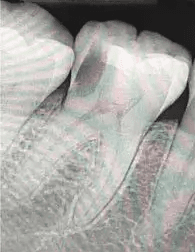
September 2025
After treatment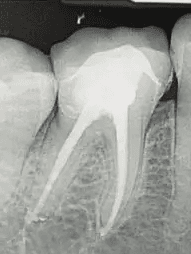
Lab results
Every test, every date, with trends and explanations.
PDF reports
Downloadable summaries you can share with other providers.
X-rays
View your x-rays side-by-side to see changes over time.
Glasses and contacts
Add the prescription your eye doctor gave you and see when it expires.
Other records
Upload results from Quest, LabCorp, or MyChart. We’ll organize them too.
Section 4: Getting into your record
Step 1: Check your email
You'll receive an invite from noreply@mydxhub.com.
Step 2: Set a password
One-time setup. Use the same login from any phone, tablet, or computer.
Step 3: Sign in anytime
Go to mydxhub.com and sign in. Your data is always there.
Privacy & security. Your data is encrypted and the platform is built to HIPAA safeguards. Your record is visible to you, the care team you extend access to, and myDxHub support accounts, whose opens land in your access log like everyone else's. You control who you share reports with, and you can halt a provider's access at any time.
Section 5: Your ongoing care
Retest reminders
We’ll nudge you to retest at 3 and 6 months. That’s how you see progress.
Share a report
One-tap share link for your physician, cardiologist, or other specialist.
Questions?
Contact your practice directly. They can see the same data you see.
Ready to look at your results?
Everything in this tour is waiting in your record, and your care team is there to guide you through every result.
Don't have an account yet? Create one yourself, or ask your practice to invite you at your next visit.